Derive structured data using LLMGraphTransformer #
Langchains LLMGraphTransformer is a specialized tool, often found within AI frameworks, designed to convert unstructured text into a structured knowledge graph. Its core function is to use a large language model to systematically identify entities, relationships, and their properties from a document. It’s important to note that this technology is still in an experimental state and requires careful configuration to achieve precise and reliable outputs.
Using LLMGraphTransformer with default prompt #
When using LLMGraphTransformer, you can either rely on its default prompt or provide a custom one to guide the LLM’s output. The default prompt is designed for a general-purpose extraction of nodes and relationships from unstructured text, which is great for a quick start. However, using a custom prompt gives you fine-grained control over the extraction process, allowing you to specify exactly what types of entities, relationships, and properties you want the model to identify. This is especially useful for domain-specific tasks where you need the LLM to adhere to a predefined schema, ensuring the resulting knowledge graph is both accurate and structured for your specific needs.
Setup: #
| LLMs | Gemini v1.5 Flash, OpenAI GPT-4o |
|---|---|
| Prompt | Default/Custom |
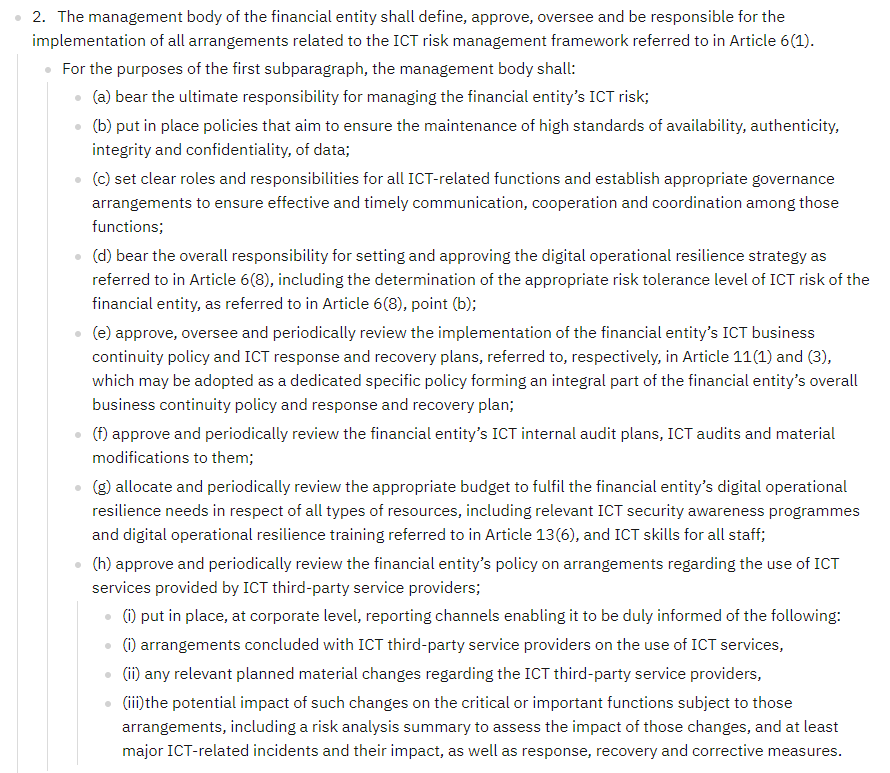
| Text | REGULATION (EU) 2022/2554 OF THE EUROPEAN PARLIAMENT AND OF THE COUNCIL (DORA): - CHAPTER II - ICT risk management, Section I, Article 5, 2nd paragraph |
For a simple visualization of the resulting graph I have used PyVis.
Objective: #
- Provide a visual (graph) representation of a text for better and faster understanding.
- Explore cpabilities and limitations of LLMGraphTransformer
- Assess accurancy
Test Cases #
Test Case 01: Default prompt, no allowed_nodes/allowed_relationships #
Let´s feed in a first step LLMGraphTransformer with the text only.
Graph #
Click on below image to view a larger and interactive version of the graph in a new tab. See the json file as provided by LLMGraphTransformer here
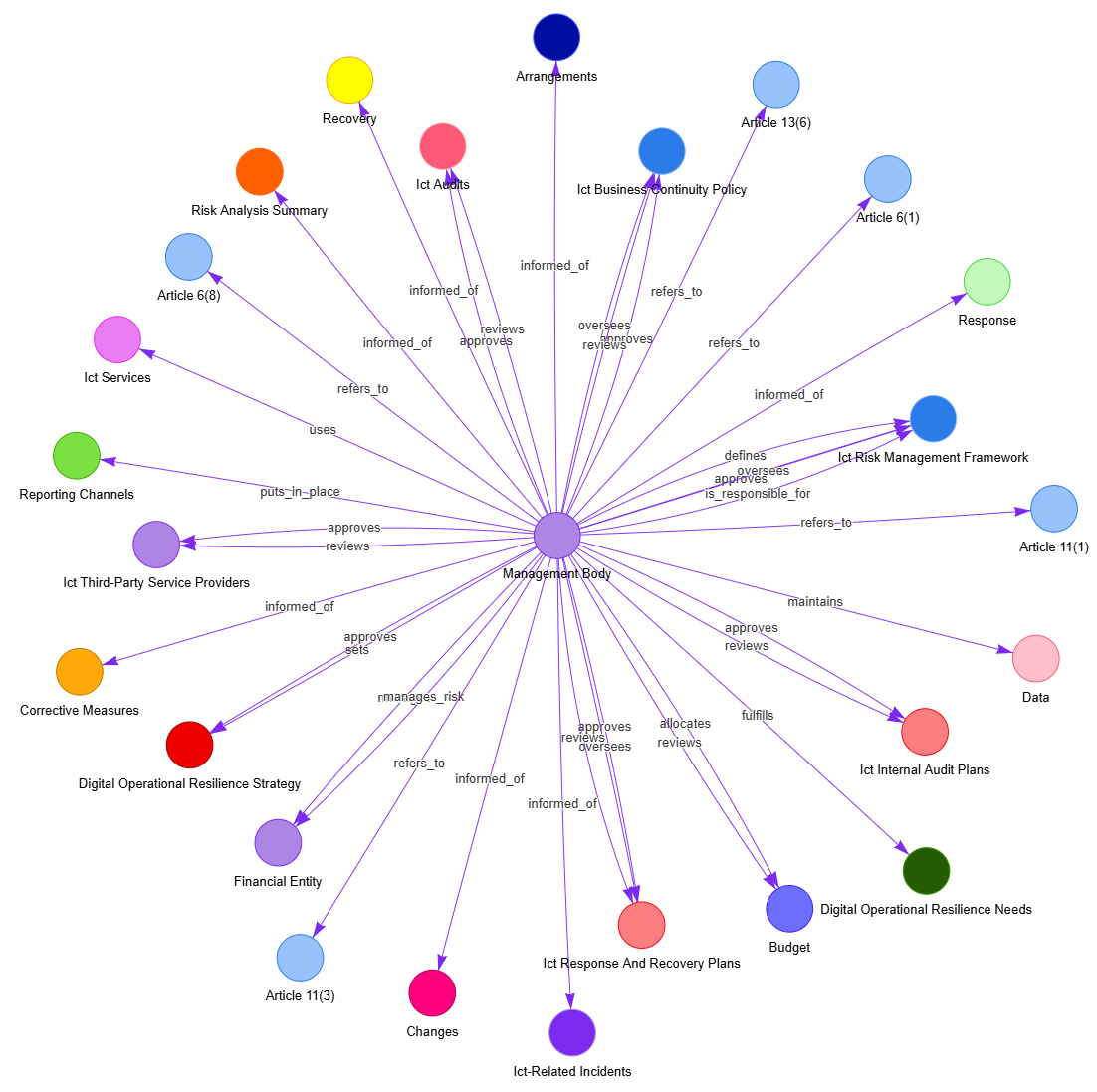
Click to open interactive Graph in new tab
Analysis: #
Verifying the extraction of entities #
From the original text I have (manually) extracted the following 67 key terms (entities) I expected to find in the graph:
Fold out to see manually extracted key terms
-
Article 11(1)
-
Article 11(3)
-
Article 13(6)
-
Article 6(1)
-
Article 6(8)
-
Article 6(8), point (b)
-
arrangements
-
authenticity
-
availability
-
budget
-
business continuity policy
-
changes
-
communication
-
confidentiality
-
cooperation
-
coordination
-
corporate level
-
corrective measure
-
critical or important functions
-
data
-
digital
-
digital operational resilience needs
-
digital operational resilience strategy
-
digital operational resilience training
-
effective communication
-
financial entity
-
functions
-
governance arrangements
-
ICT
-
ICT audits
-
ICT business continuity policy
-
ICT related functions
-
ICT response plans
-
ICT recovery plans
-
ICT risk
-
ICT risk management framework
-
ICT security awareness programmes
-
ICT services
-
ICT skills
-
ICT third-party service providers
-
implementation
-
impact
-
incidents
-
integrity
-
internal audit plans
-
management body
-
material changes
-
material modifications
-
operational resilience strategy
-
policy
-
policy on arrangements regarding the use of ICT services
-
recovery measure
-
reporting channels
-
resources
-
response and recovery plan
-
response measure
-
responsibility
-
responsibility for managing the financial entity’s ICT risk
-
risk analysis summary
-
risk tolerance level
-
roles
-
staff
-
communication
-
cooperation
-
coordination
-
responsibility
LLMGraphTransformer identified (depending on the LLM used) somewhere between 25 and 30 entities, so less than half.
Test Case 02: Default prompt with allowed_nodes, without allowed_relationships #
Now that we have a list of manually identified entities, we can pass it to the LLMGraphTransformer and get the following graph:
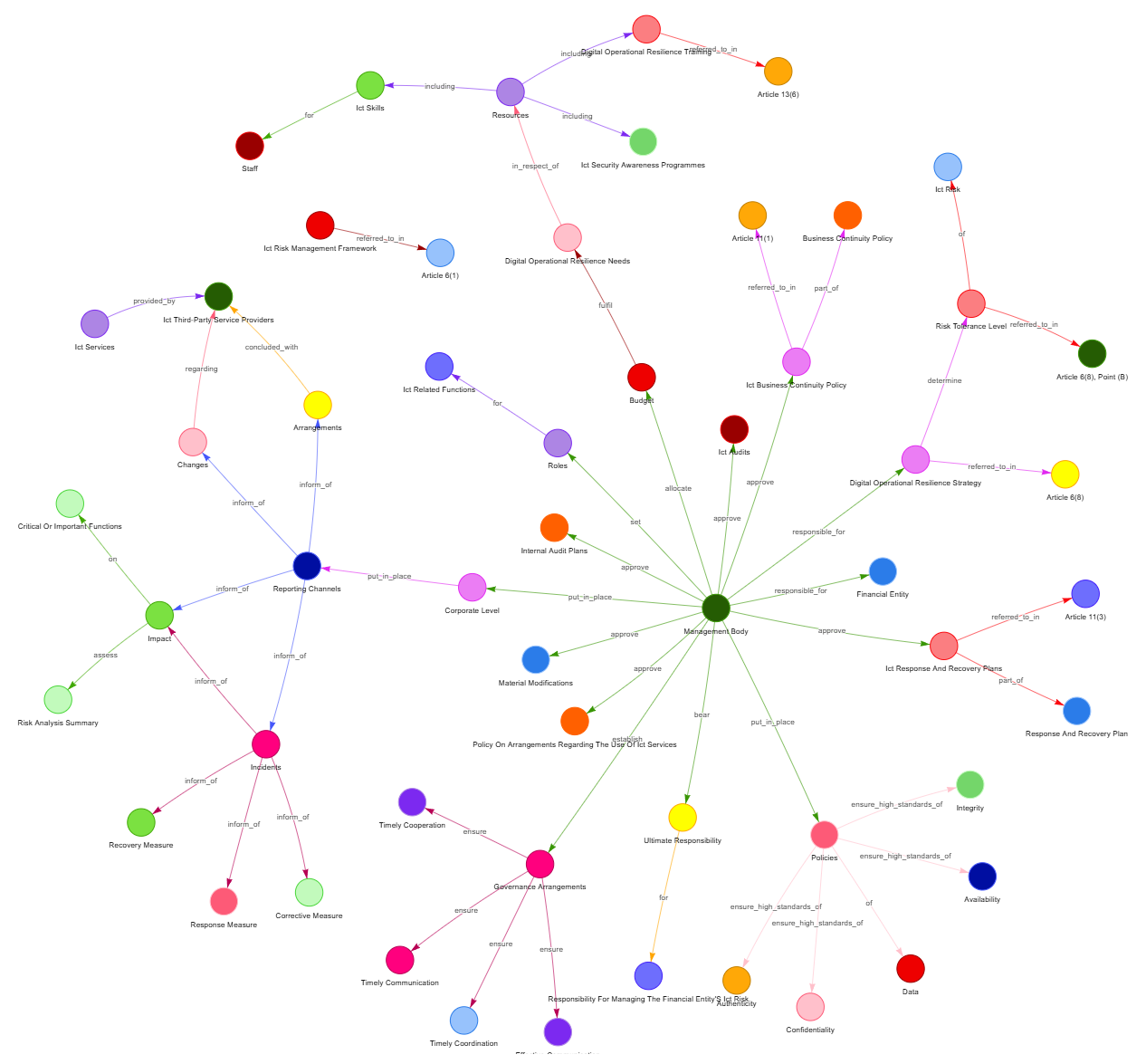
Click to open interactive Graph in new tab
Summary #
Above example shows the importance of Named Entity Recognition (NER) in Document Analysis. If we are aiming to get a full picture of the entities and their relations with each other, we require a proper ontology.
Let´s explore options on how to efficiently build this ontology, especially in a specialized or technical domain.